Restaurant POS
Seat the guest, send the order to the kitchen, and settle or split the bill from the same ticket.
3 months free
UmaPOS unites your counter, waiter app, kitchen display, table QR ordering, and billing into one platform. Built for restaurants, cafés, and takeaway.
The counter runs on a Windows PC, phone, or tablet you already own. UmaPOS hardware is available when you want a ready-made till.
What you get
Each one does a single job. They share one menu, one set of orders, and one set of reports, so a price changed once is changed at the counter, on the QR menu, and in your bills.
The counter checkout your team can learn in a single shift.
Table floor on the cashier PC, or Fast billing when there are no tables.
Every order on the kitchen screen the moment it is placed.
Guests scan, browse the menu, and send the order from their own phone.
Take orders, manage tables, and see kitchen alerts on the floor.
Queue, seating, and wait times before the guest ever sits down.
Take the order and the payment on the phone your team already carries.
Staff ask the panel how to print, import a menu, or split a bill.
Run the menu, bills, stock, and numbers from any browser.
On the way
A WhatsApp or Instagram chat becomes a kitchen ticket, without anyone retyping it.
Regulars order from an app that shows the restaurant's name, logo, and menu.
Swiggy, Zomato, and other app orders show up on the kitchen screen.
Trusted by restaurants
Patel Food
India
Spicy
India
Hari Om Madrasi Dosa
India
The Copper Pan
United Kingdom
Mayfair Kitchen
United Kingdom
The Harbour Table
United Kingdom
Harbor & Oak
United States
Brooklyn Hearth
United States
Pacific Grill
United States
Bondi Kitchen
Australia
The Laneway
Australia
Melbourne Grill
Australia
Brasserie Lumière
France
Osteria Bella Vista
Italy
Zur Alten Mühle
Germany
50%
Faster Service
Streamlined workflows from reception to kitchen
30%
Less Order Errors
Digital order flow eliminates miscommunication
100%
Digital Workflow
Every touchpoint connected in one platform
Live
Real-Time Operations
Instant updates across all devices
Who it's for
One platform for the table, the counter, and the phone. A café can turn on Fast billing. A dining room can run tables, the kitchen board, and split bills.
Seat the guest, send the order to the kitchen, and settle or split the bill from the same ticket.
Fast billing sells from the menu when there is no table. Modifiers and a short queue stay on the counter.
Waiter and Counter run on Android and iOS, so the order and the payment can happen on the phone the team already carries.
Start the counter, kitchen, and QR menu without buying hardware first. The trial is three months, then the plan you choose.
Why UmaPOS
Everything your front-of-house, kitchen, and management team needs — connected and synchronized.
Queue, seating, and wait-time intelligence — tablet & mobile app.
Order taking, tables, and live kitchen alerts on phone or tablet.
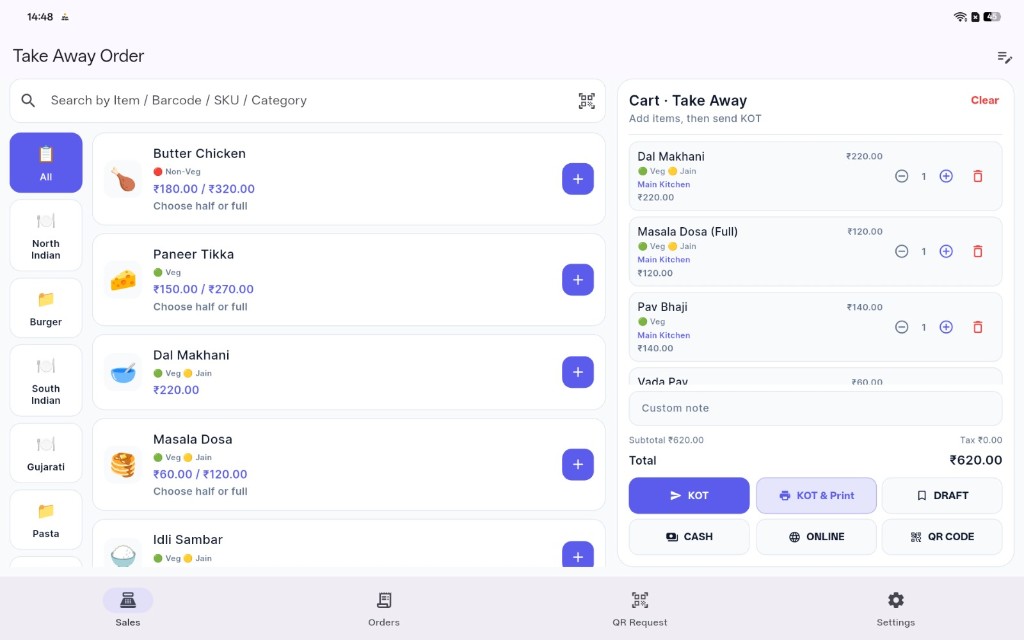
Takeaway and dine-in POS on phone, tablet, or a Windows PC — table floor and fast billing.
Station routing and KDS board on kitchen tablet or mobile.
Guests scan, browse the menu, and send orders straight to waiters or the cashier.
Counter takeaway orders with automatic token generation for pickup queues.
Upload a menu photo or PDF — AI extracts items, prices, and matches your library.
3,700+ ready dishes and 150+ category templates — search, pick, and add without typing every item.
Bill from the restaurant panel — GST/sales tax, split bills, print & history.
Stock, vendors, POs, recipes, food cost & auto consumption.
Track staff attendance, salaries, payouts, and monthly payroll reports.
Revenue, performance, and trend insights.
AI assistant, FAQs, help articles, video tutorials, and support tickets — instant answers inside your restaurant panel.
Latest upgrades
UmaPOS Counter runs on a Windows PC as well as phone and tablet. Use the table floor for dine-in, or turn on Fast billing when the shop has no tables. Menu library, AI import, and QR ordering stay included.
The cashier counter now runs on a Windows PC. Install the setup, sign in, and run tables, orders, KOT, and billing on the same live restaurant.
See every table on the Windows counter. Open a table, add the order, send it to the kitchen, and settle the bill without leaving the floor.
Small restaurants with no tables turn on Fast billing. The home screen opens the menu and guest cart so the cashier can sell and bill immediately — on Windows too.
Ready dish templates across cuisines — search by name, pick from the library, and add to your menu without writing every item from scratch.
Pre-built category templates (Butter, Pizza, Beverages, and more) so you set up sections fast and keep menus consistent across branches.
Upload a menu photo or PDF. AI reads items & prices, matches the Global Menu Library, then you preview and import in one flow.
Import products from CSV with automatic Global Menu Library matching, categories, and duplicate skipping — review before you save.
No typing every dish. Point AI at your printed menu image and get clean English names, prices, and categories ready to edit.
Guided migration for categories and products from Excel/CSV — map columns, preview rows, then import into the current branch.
Run counter takeaway from the panel or QR. UmaPOS issues pickup tokens so kitchen and counter call orders without table numbers.
Guests scan, pick from the menu, and send the order to the waiter floor or straight to the counter for billing and kitchen routing.
Ask the AI assistant, browse FAQs and help articles, watch video tutorials, or open a support ticket — all without leaving your restaurant panel.
How it works
The queue, the table, the kitchen, the bill, and the live dashboard all use that same order. Follow a service through to the reports.
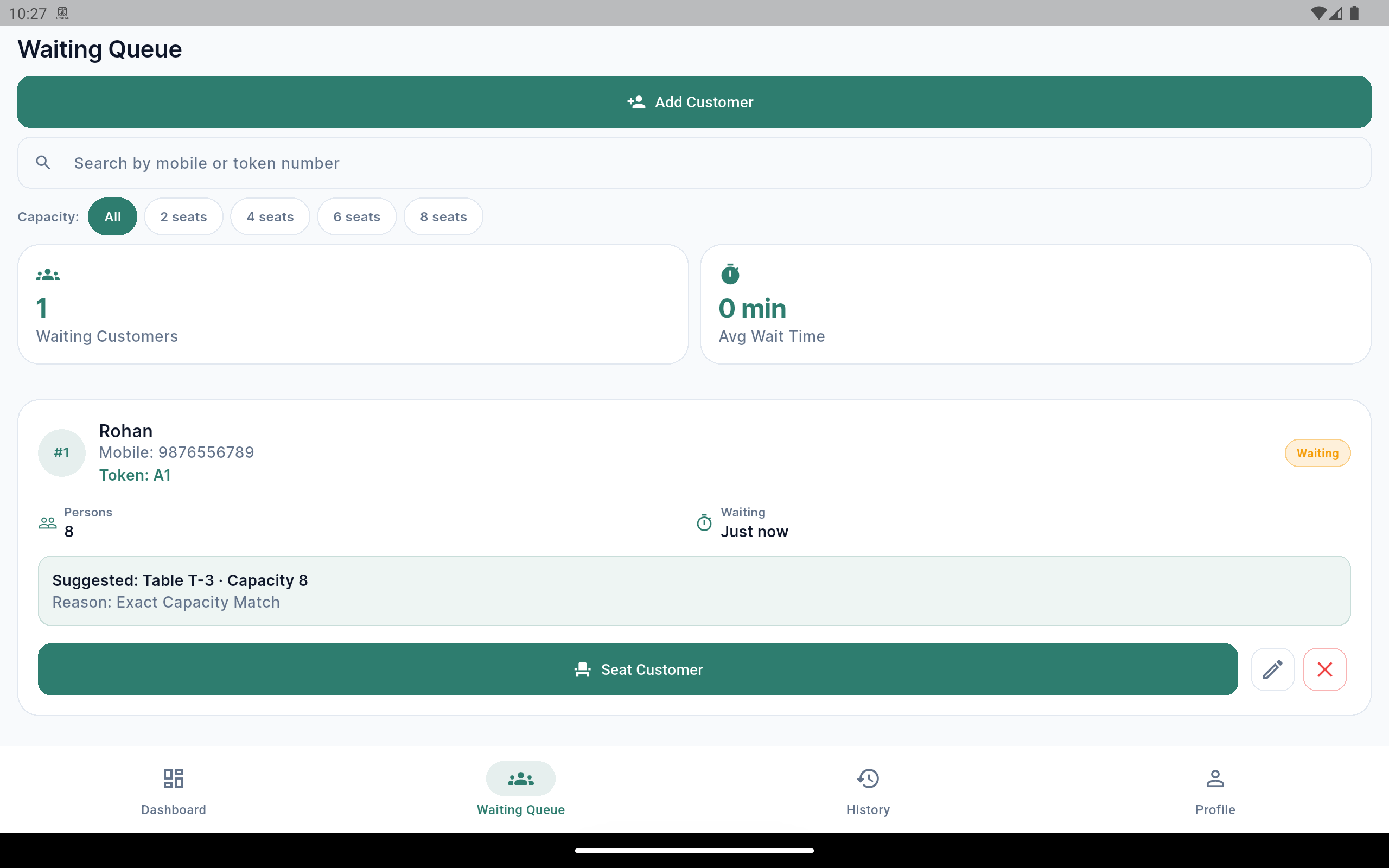
The waiting queue, next to tables that can take the party.
Reception, the waiter, the counter, the kitchen, QR ordering, and the bill share one menu and one set of orders.
One kitchen screen for every order.
A sale at the counter, a ticket from the waiter, and a QR order from the table show up together. The pass does not wait for a paper slip.
One price, on every screen.
Change a dish once. The till, the QR menu, and the printed bill use that price, including tax.
The recipe moves the stock.
Ingredients come off when the bill is settled, so food cost follows what actually left the kitchen.
Reception
Waiter
Counter
mPOS
Kitchen
QR ordering
Billing
Inventory
Multi-branch
Live floor
A waiting queue, a table that splits the bill, a takeaway rush, and the stock after the last plate. Each one uses the same orders.
People are waiting to sit. The guests already seated want to order.
Four guests, one order, and they want separate checks.
The counter line is for pickup, not for seats.
You need to know what the day actually used.
Waiter and Counter run on the phones your team already has. An order taken at the table and a payment taken on the phone use the same kitchen screen as the till.
Android builds are on Google Play. The same apps run on iPhone.
UmaPOS Waiter
UmaPOS Counter
Help & Support in the restaurant panel includes an AI assistant. It answers from UmaPOS articles, FAQs, and videos — printer setup, menu import, split bills, the kitchen screen, and stock.
If the library does not have the answer, staff mark it and open a support ticket with the question attached. This is help for your team, inside the panel.
Ask in the panel
FAQs
Short answers your team can open without a chat.
Articles & videos
The assistant searches these before it replies.
Tickets
A question it cannot answer becomes a ticket.
Dates and prices are not set. The kitchen screen already shows orders placed in UmaPOS.
Guests already message the restaurant on WhatsApp and Instagram to order. Social ordering is the step that turns that chat into a ticket on the same kitchen screen, so the counter does not retype it.
Use this today
Share the QR ordering link in the WhatsApp profile or the Instagram bio. The guest opens the menu, sends the order, and the kitchen already has it.
Planned for
Restaurants, cafés, bakeries, and cloud kitchens that take orders in chat.
Open QR orderingRegulars will open an app that shows your logo and your menu. The order lands with the counter, waiter, and QR tickets, under your name rather than a marketplace.
Use this today
Guests already order from their own phone with QR ordering. They scan a code, browse the menu, and send the order. No app to install.
Planned for
Restaurants that want regulars ordering under their own name.
Open QR orderingOrders from Swiggy, Zomato, and other delivery apps will arrive as kitchen tickets beside the counter, waiter, and QR orders. The kitchen will not wait for someone to retype the tablet.
Use this today
The kitchen screen already shows every order placed in UmaPOS. A Swiggy or Zomato order is still entered at the counter until this sync is ready.
Planned for
Restaurants and cloud kitchens that sell on Swiggy, Zomato, and similar apps.
Open the kitchen displayUmaPOS Reception
Greet guests, manage the waiting queue, and seat parties on the right table — on tablet or mobile with live floor status and smart capacity matching.

UmaPOS Counter on the cashier PC. The table floor shows every open order. Switch on Fast billing and the menu opens for a walk-in guest, with no table to pick.
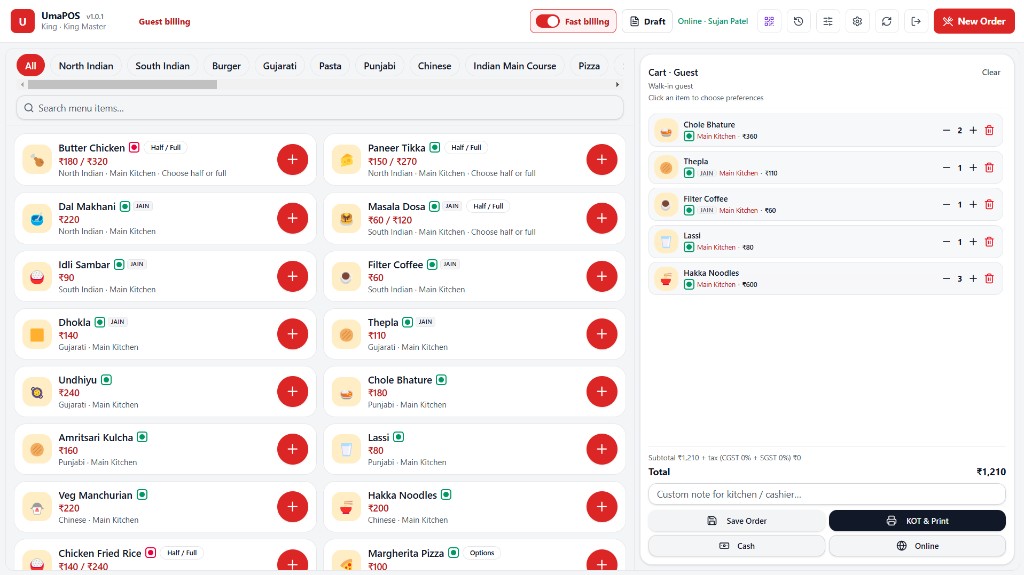
Turn Fast billing on when the shop has no tables. The menu and guest cart open on the home screen.
UmaPOS Counter
Run the table floor on a Windows PC, or switch on Fast billing when the restaurant has no tables. The same cart, KOT, and checkout also run on phone and tablet.
UmaPOS Kitchen
The kitchen board moves each ticket through New, Preparing, Ready, and Served. Production groups the same dish across tables, so the pass can start preparing or mark ready in one place.
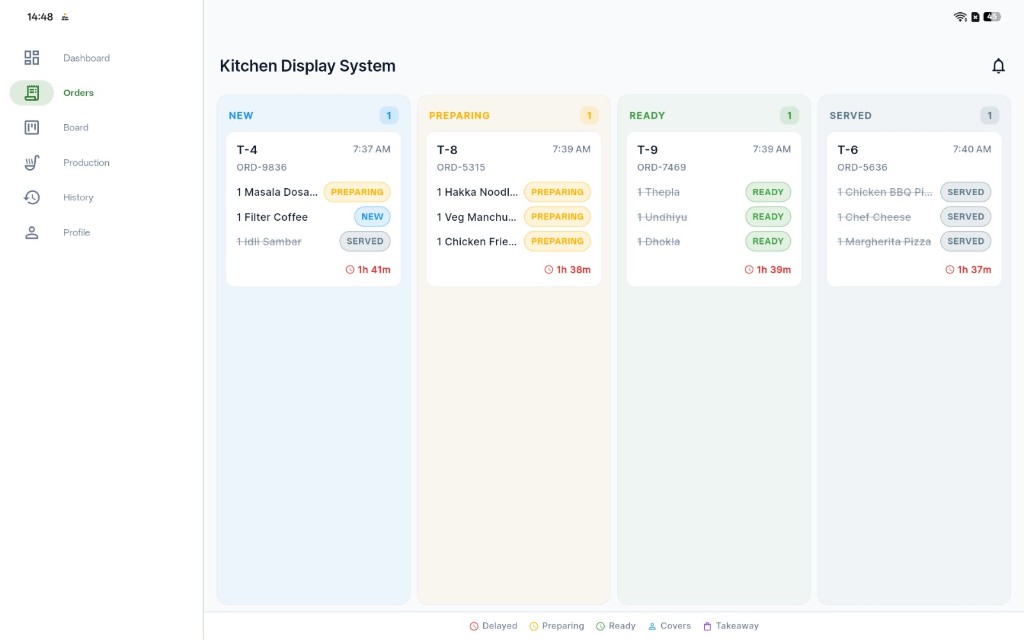
Table 7 Menu
Customer Experience
Guests scan, pick from the menu, and send orders to the waiter or counter — no app download required.
Billing & POS
Settle tables, split bills, and print invoices from the restaurant panel — with country-aware tax (GST, sales tax, or VAT) built in.
Invoice #INV-2847
Table 12 · 4 guests
Inventory ERP
Track stock, vendors, purchases, recipes, and consumption — connected to billing so ingredients deduct automatically when orders are settled.
Inventory Management
Stock · PO · Recipes · Food cost
28%
Food cost
3
Low stock
Auto
Consumption
Bulk import: name, unit, stock, min_stock → saved as Inactive until you activate.

Restaurant Panel
Book tables, run dine-in and takeaway, add items from a 3,700+ dish library or import with AI/CSV, and bill guests from the web panel — plus staff, kitchen, inventory, and live analytics.
Scale
Open branches in every country we support — each with local currency, tax rules, and centralized reporting. The list below matches subscription pricing countries.
Live Sync
Orders, kitchen updates, and customer requests flow instantly across every device.
Live event feed
Synced across all connected devices
New Orders
Floor and panel stay in sync the moment an order is placed
Kitchen Updates
Prep status moves from kitchen board to waiter apps instantly
Ready Notifications
Waiters get alerted when dishes are ready to serve
Customer Requests
QR and table requests reach staff without delay
Billing Requests
Checkout, split bills, and settlements update everywhere
Live Operations Flow
From guest arrival to feedback — every step stays connected
Why UmaPOS
The useful test is a full dining room: a split check, a late ticket, a dish that just ran out. UmaPOS is arranged around that service, from the queue to the kitchen to the bill.
Reception, waiters, the counter, the kitchen, QR ordering, and billing share one menu and one set of orders, so you stop running the floor from separate apps.
A sale at the counter, a ticket from the floor, and a QR order from the table show up together. The kitchen does not wait for a shout or a paper slip.
Search 3,700+ ready dishes and 150+ category templates, or import a photo or PDF. Prices you change once are the prices on the till, the QR menu, and the bill.
GST or sales tax, split checks, print, and bill history live in the restaurant panel. Takeaway orders can carry a pickup token instead of a table number.
Dishes are tied to ingredients. When a bill is settled, stock and food cost move with it, instead of living in a spreadsheet the kitchen never sees.
The counter runs on a Windows PC, phone, or tablet. Reception, waiter, and kitchen apps run on the devices your team carries. UmaPOS hardware is there when you want a ready-made till.
Each location keeps its own currency, tax rules, and day-to-day work, while reports can show one branch or the whole group.
Queue, tables, kitchen tickets, and bills update across devices as the service moves. Staff are not passing the same order by phone.
Before you decide
Pricing
Start free in any country with one branch. Upgrade when you need more branches, staff, or the full back office.
Testimonials
Hear from owners, managers, and chefs who transformed their operations with UmaPOS.
“UmaPOS transformed how we run our dining room. Wait times dropped and our staff finally works from one system.”
Rajesh Mehta
Restaurant Owner · Spice Garden, Mumbai
“Managing three branches used to be chaos. Now I see live orders, kitchen status, and revenue in one dashboard.”
Priya Sharma
Operations Manager · Urban Brew Café Chain
“Kitchen tickets route to the right station automatically. No more shouting across the pass — everything is on screen.”
Chef Arjun Patel
Head Chef · The Grand Plate, Ahmedabad
Reception, the counter, QR ordering, the kitchen, and the bill — the questions that come up before a trial.
UmaPOS is a complete restaurant operating system — not just a POS. It connects reception, waiters, counter / takeaway, kitchen, customer QR ordering, takeaway tokens, a 3,700+ Global Menu Library, AI menu import, billing, inventory & food cost, and analytics in one real-time platform.
Yes. Professional and Enterprise plans support multi-branch management across India, the US, the UK, and other supported countries — with local currency, tax (GST, VAT, or sales tax), and centralized reporting across all locations.
No. Customers scan a QR code at their table (or for takeaway) and order through their mobile browser — no download required.
Yes. UmaPOS Reception, Waiter, Counter, and Kitchen apps are built for both tablets and phones on Android and iOS. UmaPOS Counter is also a Windows app for the cashier PC. The restaurant web panel works in any modern browser on desktop, laptop, or tablet.
UmaPOS Counter is the cashier app for takeaway and dine-in. It runs on Android, iOS, and Windows. On a Windows PC the cashier sees the table floor, or turns on Fast billing to sell from the menu and guest cart when the shop has no tables. Staff send KOT, print, and take Cash or Online — synced live with the kitchen and the restaurant panel.
Yes. UmaPOS Counter is a Windows app for the cashier computer, as well as the phone and tablet app. Windows includes the table floor for dine-in — open a table, take the order, and bill it — and Fast billing for small restaurants that do not use tables. The menu and guest cart open on the home screen so the cashier can sell immediately.
Yes. The restaurant panel includes direct table booking, running orders, billing & POS, split bills, invoice printing, and billing history — without a separate cash register system.
Absolutely. Guests scan a QR, browse the menu, add items to cart, and send the order to the waiter or cashier for approval — plus request the bill or call for assistance.
Yes. Start from the Global Menu Library with 3,700+ ready dishes and 150+ category templates — search and add without typing every name. Or use AI Menu Import for a menu photo/PDF, smart CSV import with library matching, or the Migration Wizard for guided Excel/CSV migration.
A shared template catalog with thousands of F&B items across categories (dosa, pizza, beverages, and more). While adding a product, type a name to autosuggest from the library, or import matched items in bulk. Category templates help you set up menus quickly without building everything from scratch.
Yes. Place takeaway orders from the panel or QR flow; UmaPOS generates pickup tokens so the counter and kitchen can call orders clearly without table numbers.
Orders are routed to kitchen sections based on your menu configuration. Chefs see station-specific tickets, mark items ready, and waiters get instant notifications.
UmaPOS works for restaurants, cafés, pizza shops, fast food, coffee shops, cloud kitchens, fine dining, food courts, hotel restaurants, bars, bakeries, food trucks, and multi-branch chains — one platform for dine-in, takeaway, and delivery workflows.
Yes. The Inventory ERP module covers stock items, categories, units, vendors, purchase orders, goods receipts, recipes, food cost analysis, wastage, adjustments, and a full transaction log. Import many items via CSV (saved as Inactive until reviewed), and ingredients auto-deduct when bills are settled.
Set up a free trial yourself, or book a demo and we will walk through the counter, kitchen, and QR ordering with you.
Share a few details and we will walk through the counter, kitchen, and QR ordering with you. Your enquiry goes straight to the UmaPOS team.